OrsPlugin
These services support the usage of plugins and contexts.
Classes
AbstractPlugin
- class ORSServiceClass.OrsPlugin.abstractPlugin.AbstractPlugin(*args, **kwargs)
Abstract class of the plugin definition.
Class variables:
multiple: whenTrue, multiple instances of the plugin can be created. WhenFalse, only 1 instance can be created.stateDescriptors: list of instances ofORSServiceClass.OrsPlugin.statedescriptor.StateDescriptor.UIDescriptors: list of instances ofORSServiceClass.OrsPlugin.uidescriptor.UIDescriptor.
- cleanup()
Deletes the variables managed by the plugin. It is the place to remove callbacks and other references to Python objects that would prevent them to be garbage collected. This method is called during the process of deletion of the plugin. It calls for the cleanup and deletion of the forms.
- closeWidget(name)
Requests to close the form with the provided name.
- Parameters:
name (str) – name of the form to close
- deletePlugin(aWidget=None)
Starts the process of cleaning and deletion of the plugin and of his forms.
- Parameters:
aWidget – (deprecated argument)
- classmethod importAllLoggingClasses() list[Type]
This method is called to make any class extension available for macro playing. It should:
import all class extension;
return a list of classes where logging is supported.
- Returns:
output (list of classes) – list of classes where logging is supported by the current plugin
- isClosable()
Gets to know if the plugin is allowed to be closed by the user
- Return:
True if the plugin is allowed to be closed by the user, False otherwise.
- Rtype:
bool
- openWidget(name, dock=None, tab=None, x=-1, y=-1, w=-1, l=-1, order=-1, show=True)
Instantiates the widget with the provided name. This is done only if it is not already instantiated.
- Parameters:
name (str) – name of the widget to instantiate
dock (str) – docking location in the main window (left, right, top, bottom, center, floating)
tab (str) – name of the tab to dock in
x (int) – position of top left corner of window in x. Use -1 for default value.
y (int) – position of top left corner of window in y. Use -1 for default value.
w (int) – width of window. Use -1 for default value.
l (int) – height of window. Use -1 for default value.
order (int.) – position of widget in docking location. Use -1 to put at the end.
show (bool) – if
True, the form is also shown after being instantiated. If the form already exists, a “raise” is done. IfFalse, no call to show the form is made.
- postLoadSession()
Placeholder for code that needs to get executed when a session is loaded. Note that this method is called at the very end of the process, when the model has been restored, plugins have been instantiated and the workspace has been restored.
- prePublishInSession()
Placeholder for code that needs to get executed when a session is loaded, before the object model gets published. Note that this method is called after all plugins have been created.
- classmethod startupDefault(*args, openMainForm=True, **kwargs)
Creates an instance of the plugin class and opens the main form (if required) at the default position.
- Returns:
output (AbstractPlugin) – plugin instance
- classmethod tr(text)
Helper method to mimic how Qt behaves in the C++ side :param text: text to be translated :return: translated text
OrsPlugin
- class ORSServiceClass.OrsPlugin.orsPlugin.OrsPlugin(*args, **kwargs)
Bases:
AbstractPlugin- closeWidget(name)
Requests to close the form with the provided name.
- Parameters:
name (str) – name of the form to close
- enterTemporaryAction(handleName, autoActivated=True)
Stack the specified state
- Parameters:
handleName (str) – new state to stack
autoActivated (bool) – if
True, the state activation of handleName will be put to an empty string, that will activate the handler even if the action is not the state activation specified in the plugin. IfFalse, the state activation will remain unchanged.
- exitTemporaryAction(handleName, autoActivated=True)
Unstack the specified state
- Parameters:
handleName (str) – state to unstack
autoActivated (bool) – if
True, the state activation of handleName will be put back to what it was whenenterTemporaryActionwas called; ifFalse, the state activation is not modified.
- forwardHandleChangedToPluginExtendedInfrastructureClassInstances(oldState, newState)
Forwards the call of “handleChanged” to the plugin extended infrastructure class instances.
- Parameters:
oldState (str) – name of the old (previous) state
newState (str) – name of the new (current) state
- forwardHandleTriggeredToPluginExtendedInfrastructureClassInstances(eventData)
Forwards the call of “handleTriggered” to the plugin extended infrastructure class instances.
- Parameters:
eventData (OrsEvent.eventdata.InputEventData) – the event data
- generateTemporaryActionForHandle(handleName, autoActivated=True, enter='', action='', exit='')
Gets an action object for which the default enterAction is to stack a state and the default exitAction is to unstack that state. This is to be used for temporary actions.
- Parameters:
handleName (str) – state to stack
autoActivated (bool) – if
True, the state activation of handleName will be put to an empty string, that will activate the handler even if the action is not the state activation specified in the plugin. IfFalse, the state activation will remain unchanged.enter (str) – action string to set instead of the enterTemporaryAction call
action (str) – action string to set
exit (str) – action string to set instead of the exitTemporaryAction call
- Return:
an Action instance
- Rtype:
- getActionStringForSetCurrentGlobalState(state)
Gets a formatted string to be put as action command (in enterAction, action or exitAction) that will set the current global state of the application.
- Parameters:
state (str) – state to set
- Return:
action string
- Rtype:
str
- classmethod getActionStringForStartupDefault()
Gets a formatted string to be put as action command (usually in enterAction) that will call for the method
ORSServiceClass.OrsPlugin.abstractPlugin.startupDefault().- Returns:
output (str) – action string
- classmethod getActionsFromInfrastructure()
Gets the actions managed by the plugin. These actions include those defined by:
the plugin;
any other plugin extended infrastructure class supported by the plugin.
- Returns:
output (list of func) – list of action functions
- getHandleActivation(state)
Gets the name of the (action) method of the given state activation
- Parameters:
state (str) – name of the state
- Return:
name of the method of the given state activation
- Rtype:
str
- classmethod getInterestsFromInfrastructure()
Gets the interests managed by the plugin. These interests include those defined by:
the plugin;
any other plugin extended infrastructure class supported by the plugin.
- Returns:
output (list of func) – list of interests functions
- classmethod getMainFormClass()
Gets the class of the main form
- Returns:
output –
- classmethod getMainFormTitle()
Gets the main form title.
It is assumed that the main form is described in the first item of the list UIDescriptors.
- Returns:
output (str) – main form title
- classmethod getMenuItemsFromInfrastructure()
Gets the menu items managed by the plugin. These menu items include those defined by:
the plugin;
any other plugin extended infrastructure class supported by the plugin.
- Returns:
output (list of func) – list of menu items functions
- getPluginExtendedInfrastructureClassInstance(pluginExtendedInfrastructureClass)
Gets the instance associated to the plugin extended infrastructure class.
- Parameters:
pluginExtendedInfrastructureClass (plugin extended infrastructure class) – a plugin extended infrastructure class supported by the plugin
- Return:
an instance of the plugin extended infrastructure class
- Rtype:
instance of plugin extended infrastructure class
- classmethod getPluginExtendedInfrastructureClasses()
Gets the list of the supported plugin extended infrastructure classes of the plugin.
- Returns:
output (list of classes) – list of the plugin extended infrastructure classes
- classmethod getRestTime()
Gets the default rest time
- Returns:
output –
- getState()
This method is called when saving a plugin instance in a session to obtain the information required to set up the plugin at the loading of the session.
The plugin needs to be savable (see
ORSServiceClass.OrsPlugin.abstractPlugin.AbstractPlugin.savable).- Return:
a string of information that will be sent back to the setState method
- Rtype:
str
Note
The usage of the character
"is not permitted, unless escaped.
- classmethod getStateDescriptors()
Gets the state descriptors managed by the plugin. These state descriptors include those defined by:
the plugin;
any other plugin extended infrastructure class supported by the plugin.
- Returns:
output (list of StateDescriptor) – list of instances of StateDescriptor
- handleChanged(oldState, newState)
This method is called when the state of the application is changed.
- Parameters:
oldState (str) – name of the old (previous) state
newState (str) – name of the new (current) state
- handleTriggered(eventData)
This method is called on every user input (mouse move, mouse click, key press, …) when the current state of the application is one of those declared by the plugin. This method can be used to perform specific tasks even if no action is currently in progress.
- Parameters:
eventData (OrsEvent.eventdata.InputEventData) – the event data
- openWidget(name, dock=None, tab=None, x=-1, y=-1, w=-1, l=-1, order=-1, show=True)
Instantiates the widget with the provided name. This is done only if it is not already instantiated.
- Parameters:
name (str) – name of the widget to instantiate
dock (str) – docking location in the main window (left, right, top, bottom, center, floating)
tab (str) – name of the tab to dock in
x (int) – position of top left corner of window in x. Use -1 for default value.
y (int) – position of top left corner of window in y. Use -1 for default value.
w (int) – width of window. Use -1 for default value.
l (int) – height of window. Use -1 for default value.
order (int.) – position of widget in docking location. Use -1 to put at the end.
show (bool) – if
True, the form is also shown after being instantiated. If the form already exists, a “raise” is done. IfFalse, no call to show the form is made.
- refreshUIFromModel()
Calls the UI to be updated based on the implementation
- runningInCurrentContext()
Gets if the plugin is in the current context
- Return:
Trueif the plugin is in the current context;Falseotherwise.- Rtype:
bool
- setCursor(state)
Sets the current cursor
- Parameters:
state (str) – state associated to the cursor to set
- setHandleActivation(state, activation)
Sets the name of the method of the given state activation
- Parameters:
state (str) – name of the state. This state should be among those defined by the plugin.
activation (str) – name of the method of the given state activation
- setState(state)
This method is called to set up the plugin when loading a session.
Note
This method is called only if the string returned by
ORSServiceClass.OrsPlugin.orsPlugin.OrsPlugin.getState()at the saving of the session was not empty.- Parameters:
state (str) – string of information as provided by the getState during the saving of the session
OrsMainPluginContext
- class ORSServiceClass.OrsPlugin.orsMainPluginContext.OrsMainPluginContext(*args, **kwargs)
Bases:
OrsPluginAbstract class of a Python plugin, serving as the main plugin in a context. The context is provided by a context plugin, different than the current plugin. The context is created at the instantiation of this main plugin and deleted at the deletion of this plugin.
- addObjectInContextGroup(anObject, anObjectTag)
Adds an object to the context group with the provided tag. The object is added to the delete set of the context group if that object is exclusive to the context in order to be deleted when the context group gets deleted. Otherwise, the context group is added in the delete set of the object in order to be deleted when the object gets deleted.
- Parameters:
anObject (ORSModel.ors.Managed) – an object to add in the context group
anObjectTag (str) – the object tag
- cleanup()
Deletes the variables managed by the plugin. It is the place to remove callbacks and other references to Python objects that would prevent them to be garbage collected. This method is called during the process of deletion of the plugin. It calls for the cleanup and deletion of the forms.
- cleanupLayout()
Deletes the top frame objects of the current context. The layout and views are kept in the context group (if used).
- clearContextGroupTag(anObjectTag)
Removes all objects of the context group from the provided tag. The delete set of the group is cleaned in the same way as for
ORSServiceClass.OrsPlugin.orsMainPluginContext.OrsMainPluginContext.removeObjectFromContextGroup()- Parameters:
anObjectTag (str) – the object tag
- confirmCloseContext()
Requests the confirmation from the user to close the context.
- Return:
Trueto confirm the closing of the context;Falseto ignore the closing request and keep the context open.- Rtype:
bool
- deletePlugin(aWidget=None)
Starts the process of cleaning and deletion of the plugin and of his forms.
- Parameters:
aWidget – (deprecated argument)
- interfacemethod extractObjectFromContextGroup(aContextGroup: Group, anObjectToExtract: Managed) Managed
Extracts an object from a context group by making a copy.
- Parameters:
aContextGroup (ORSModel.ors.Group) – a context group
anObjectToExtract (ORSModel.ors.Managed) – an object to extract
- Returns:
extractedObject (ORSModel.ors.Managed) – extracted object
- getContextObjects()
Gets the objects managed by the context main plugin.
- Return:
list of objects
- Rtype:
- Rcount:
[0, None]
- getFirstObjectFromContextGroup(anObjectTag)
Gets the first object contained in the context group for the provided tag
- Parameters:
anObjectTag (str) – the object tag
- Return:
first object contained in the context group for the provided tag
- Rtype:
- getIsAllowedToBeDeleted(anObject)
Gets to know if the object is allowed to be deleted in the context. This is to prevent a mandatory object of the context to be deleted while the context is alive (modal contexts).
- Parameters:
anObject (ORSModel.ors.Managed) – an object
- Return:
Trueif the object is allowed to be deleted in the context;Falseotherwise.- Rtype:
bool
- getIsObjectAvailable(anObject)
Gets to know if the object is available in the context.
- Parameters:
anObject (ORSModel.ors.Managed) – an object
- Return:
Trueif the object is available in the context;Falseotherwise.- Rtype:
bool
- classmethod getMainFormClass()
Gets the class of the main form
- Returns:
output –
- getObjectsFromContextGroup(anObjectTag)
Gets the object(s) contained in the context group for the provided tag
- Parameters:
anObjectTag (str) – the object tag
- Return:
list of objects contained in the context group for the provided tag
- Rtype:
- Rcount:
[0, None]
- getState()
This method is called when saving a plugin instance in a session to obtain the information required to set up the plugin at the loading of the session.
The plugin needs to be savable (see
ORSServiceClass.OrsPlugin.abstractPlugin.AbstractPlugin.savable).- Return:
a string of information that will be sent back to the setState method
- Rtype:
str
Note
The usage of the character
"is not permitted, unless escaped.
- getStateStartContext()
Gets the string to execute to start the context at the loading of the session.
- Return:
string to execute
- Rtype:
str
- isClosable()
Gets to know if the context is allowed to be closed by the user. Overloading the plugin behavior, as a context can generally be closed.
- isPluginInstanceAllowedToBeSavedInContext(varNameWithPrefix)
Gets if a plugin is allowed to be saved in a session and restarted at the loading of the session. Plugins managed by the context are normally not saved in the context on their own.
- Parameters:
varNameWithPrefix (str) – varName with the format “OrsGlobalVariables.aPlugin1001”
- Return:
Trueto allow the plugin to be included in the loading of the session;Falseotherwise.- Rtype:
bool
- isPluginMandatory(aPlugin)
Gets to know if the plugin is mandatory in the context
- Parameters:
aPlugin (AbstractPlugin) – a plugin
- Return:
True if the plugin must remain in the context, False if the plugin is allowed to be closed.
- Rtype:
bool
- onPostCopy(newObjectFromCopy, sourceObject)
Perform tasks once an object gets copied.
- Parameters:
newObjectFromCopy (ORSModel.ors.Managed) – object obtained as a copy
sourceObject (ORSModel.ors.Managed) – object copied
- onPostLoad(loadedObject)
Perform tasks once an object gets loaded.
- Parameters:
loadedObject (ORSModel.ors.Managed) – loaded object
- openWidget(name, dock=None, tab=None, x=-1, y=-1, w=-1, l=-1, order=-1, show=True)
Instantiates the widget with the provided name. This is done only if it is not already instantiated.
- Parameters:
name (str) – name of the widget to instantiate
dock (str) – docking location in the main window (left, right, top, bottom, center, floating)
tab (str) – name of the tab to dock in
x (int) – position of top left corner of window in x. Use -1 for default value.
y (int) – position of top left corner of window in y. Use -1 for default value.
w (int) – width of window. Use -1 for default value.
l (int) – height of window. Use -1 for default value.
order (int.) – position of widget in docking location. Use -1 to put at the end.
show (bool) – if
True, the form is also shown after being instantiated. If the form already exists, a “raise” is done. IfFalse, no call to show the form is made.
- classmethod postCopyContextGroup(aContextGroup, mapCopies)
Performs operations to update a copied context group.
- Parameters:
aContextGroup (ORSModel.ors.Group) – a context group
mapCopies (dict) – map of the copy object to the source object
- classmethod postLoadContextGroup(aContextGroup)
Performs operations to update a loaded context group.
- Parameters:
aContextGroup (ORSModel.ors.Group) – a context group
- postLoadSession()
Placeholder for code that needs to get executed when a session is loaded. Note that this method is called at the very end of the process, when the model has been restored, plugins have been instantiated and the workspace has been restored.
- removeObjectFromContextGroup(anObject, anObjectTag)
Removes an object from the context group (from the provided tag only). If the object doesn’t belong to the context group after being removed from this tag, the object will be taken out of the delete set of the context group if it was present and the context group will be taken out of the delete set of the object if it was present.
- Parameters:
anObject (ORSModel.ors.Managed) – an object to remove from the context group
anObjectTag (str) – the object tag
- replaceObjectInContextGroup(anObject, anObjectTag)
Removes all objects at the specified tag of the context group and adds the provided object to that tag
- Parameters:
anObject (ORSModel.ors.Managed) – an object to add in the context group
anObjectTag (str) – the object tag
- resetContextGroupTitle()
Resets the context group title.
- setContextTopLayout(topLayout)
Sets the context top layout. This information comes normally from the LayoutHelper.
- Parameters:
topLayout (ORSModel.ors.Layout) – the context top layout
- setState(state)
Setting the plugin state using the provided state information.
- Parameters:
state (str) – plugin state information. Contains the GUID of the group to use. The state of the plugin is contained in a UserInfo element of the group.
- setupContext(openMainForm=True)
Performs the tasks to setup the context. This is normally done after the instantiation of the main plugin in context and setting his state.
These are the usual tasks:
instantiate all required plugins;
define context restrictions (actions, states, …);
- open the main window with the mainform of the main plugin in context and all plugin forms
(if
openMainFormisTrue);
initialize the menu (if wanted);
perform any other task to initialize the context (configure views, text presenters, …).
- Parameters:
openMainForm (bool) –
Trueto use the forms;Falseotherwise.
- classmethod startupDefault(openMainForm=True)
Creates an instance of the plugin class and opens the main form (if required) at the default position.
- Returns:
output (AbstractPlugin) – plugin instance
OrsAbstractWizardPlugin
- class ORSServiceClass.OrsPlugin.orsabstractwizardplugin.OrsAbstractWizardPlugin(*args, **kwargs)
Bases:
OrsMainPluginContextAbstract class of a Python plugin acting as a wizard.
- cleanup()
Deletes the variables managed by the plugin. It is the place to remove callbacks and other references to Python objects that would prevent them to be garbage collected. This method is called during the process of deletion of the plugin. It calls for the cleanup and deletion of the forms.
- classmethod getActionsFromInfrastructure()
Gets the actions managed by the plugin. These actions include those defined by:
the plugin;
the wizard page models.
- Returns:
output (list of func) – list of action functions
- getCurrentWizardPageSubtitle()
Gets the text used as subtitle on the page.
Return carriage (”\n” character) may be used in the string.
- Return:
subtitle
- Rtype:
str
- getCurrentWizardPageTitle()
Gets the text used as title on the page.
- Return:
title
- Rtype:
str
- classmethod getImageRepresentation()
Method called to obtain a bitmap representing the Wizard, mostly to build a quick launch toolbar where each wizard has a button to start it
- Returns:
output (QPixmap) – an image
- classmethod getInterestsFromInfrastructure()
Gets the interests managed by the plugin. These interests include those defined by:
the plugin;
the wizard page models.
- Returns:
output (list of func) – list of interests functions
- classmethod getLicenseInformation()
Gets the license info of the wizard, if it’s license protected. Was done for RWP.
- classmethod getMenuItemsFromInfrastructure()
Gets the menu items managed by the plugin. These menu items include those defined by:
the plugin;
the wizard page models.
- Returns:
output (list of func) – list of menu items functions
- getShowWizardButtonRestart()
Gets to know if the button “Restart/New Session…” can be shown. It requires the plugin to be able to start from the command “startupDefault()”.
- Return:
Trueto show the button “Restart/New Session…”;Falseotherwise.- Rtype:
bool
- classmethod getStateDescriptors()
Gets the state descriptors managed by the plugin. These state descriptors include those defined by:
the plugin;
the wizard page models.
These states should all be different.
- Returns:
output (list of StateDescriptor) – list of instances of StateDescriptor
- getWizardPageUniqueIdentifierForContextGroup(wizardPageModel)
Gets an unique identifier for the wizard page model to be used as part of a group key. It could be used for example as prefix with a string defined in the wizard page model. This should be used to avoid any collision with other classes using the same context group, such as other wizard page models.
- Parameters:
wizardPageModel (OrsAbstractWizardPageModel) – wizard page model
- Return:
identifier
- Rtype:
str
- handleChanged(oldState, newState)
This method is called when the state of the application is changed.
- Parameters:
oldState (str) – name of the old (previous) state
newState (str) – name of the new (current) state
- handleTriggered(eventData)
This method is called on every user input (mouse move, mouse click, key press, …) when the current state of the application is one of those declared by the plugin. This method can be used to perform specific tasks even if no action is currently in progress.
- Parameters:
eventData (OrsEvent.eventdata.InputEventData) – the event data
- hideCommonWizardObjects()
Hides objects used by multiple wizard pages. This is to make sure there is no “phantom object” of a page in another one. This is normally called by a wizard page during the terminatePage method.
- classmethod importAllLoggingClasses()
This method is called to make any class extension available for macro playing. It should:
import all class extension;
return a list of classes where logging is supported.
- Returns:
output (list of classes) – list of classes where logging is supported by the current plugin
- instantiateWizardPagesForms(parent)
Instantiation of the wizard pages forms
- isPluginInstanceAllowedToBeSavedInContext(varNameWithPrefix)
Gets if a plugin is allowed to be saved in a session and restarted at the loading of the session. Plugins managed by the context are normally not saved in the context on their own.
- Parameters:
varNameWithPrefix (str) – varName with the format “OrsGlobalVariables.aPlugin1001”
- Return:
Trueto allow the plugin to be included in the loading of the session;Falseotherwise.- Rtype:
bool
OrsAbstractWizardPageModel
- class ORSServiceClass.OrsPlugin.orsabstractwizardpagemodel.OrsAbstractWizardPageModel
Bases:
object- cleanup()
Method called just before the destruction of the page. It is the place to delete temporary objects that were created for the model.
- getCurrentGlobalState()
Method called (usually by a wizard page form) to know the current global state of the wizard context
- Return:
current global state
- Rtype:
str
- getIsReadyToBack()
Method called to know if the wizard page can be left by going backward with “Back”.
- Return:
Trueif the page can be left by going backward with “Back”;Falseotherwise.- Rtype:
bool
- getIsReadyToPostProcess()
Method called to know if the wizard page can be left by going forward with “Next”.
- Return:
Trueif the page can be left by going forward with “Next”;Falseotherwise.- Rtype:
bool
- getWizardPageState()
Gets the wizard page state.
To be overloaded (when the plugin uses the context group (see
ORSServiceClass.OrsPlugin.orsMainPluginContext._getUseContextGroup())).- Return:
wizard page state
- Rtype:
str
- handleChanged(oldState, newState, aWizardPageForm)
Method called from the plugin “handleChanged” method when this wizard page is the current one in the wizard.
- Parameters:
oldState (str) – name of the old (previous) state
newState (str) – name of the new (current) state
aWizardPageForm (OrsAbstractWizardPageForm) – current wizard page form
- handleTriggered(eventData)
Method called from the plugin “handleTriggered” method when this wizard page is the current one in the wizard.
- Parameters:
eventData (OrsEvent.eventdata.InputEventData) – the event data
- initializePage(aWizardPageForm)
This method is called to prepare the page just before it is shown. It should put the forms of the plugins in their correct location.
- isPluginInstanceAllowedToBeSavedInContext(varNameWithPrefix)
Gets if a plugin is allowed to be saved in a session and restarted at the loading of the session. Plugins managed by the context are normally not saved in the context on their own.
- Parameters:
varNameWithPrefix (str) – varName with the format “OrsGlobalVariables.aPlugin1001”
- Return:
Trueto allow the plugin to be included in the loading of the session;Falseotherwise.- Rtype:
bool
- postProcess()
Method called just before the page is left (still visible). It is the place to do computation at the exit of the page (going forward with “Next”).
- postShow()
This method is called to prepare the page just after it is shown.
- processWizardFinished()
This method is called to perform any task when the wizard is finished.
- refreshOnDeleteObject(anObjectGUID)
Method called to perform an update of the wizard page when an object gets deleted (when the callback is set in the context plugin). It can be used for example to update the object ordering model of the wizard page.
- Parameters:
anObjectGUID (str) – GUID of the object deleted
- refreshOnPublishObject(anObject)
Method called to perform an update of the wizard page when an object gets published (when the callback is set in the context plugin). It can be used for example to update the object ordering model of the wizard page.
- Parameters:
anObject (ORSModel.ors.Managed) – object published
- setCurrentGlobalState(newState)
Sets the current global state of the wizard context.
This method is usually called by a wizard page form.
- Parameters:
newState (str) – new state
- Returns:
globalStateChangeIsSuccessful (bool) – indicates if the change was successful
- setCurrentGlobalStateAtInitializePage()
This method sets the global state to agree with one defined by the model or the default one. This is done essentially to avoid getting into a wizard page with the cursor of a preceding page.
- setWizardPageState(dataAsString)
Sets the wizard page state. This state information comes initially from a call to getWizardPageState.
To be overloaded (when the plugin uses the context group (see
ORSServiceClass.OrsPlugin.orsMainPluginContext._getUseContextGroup())).- Parameters:
dataAsString – wizard page state
dataAsString – str
- switchToWizardPageBackRequested()
Method called to request the “Back” operation. It is the place to query the user for any information prior to start a switch page.
- Return:
Trueto accept the page switch request;Falseto reject it.- Rtype:
bool
- switchToWizardPageNextRequested()
Method called to request the “Next” operation. It is the place to query the user for any information prior to start a switch page.
- Return:
Trueto accept the page switch request;Falseto reject it.- Rtype:
bool
- terminatePage(aWizardPageForm)
This method is called to terminate the page after it is hidden.
- classmethod tr(text)
Helper method to mimic how Qt behaves in the C++ side :param text: text to be translated :return: translated text
StateDescriptor
- class ORSServiceClass.OrsPlugin.statedescriptor.StateDescriptor(state='', stateActivation='', title='', cursor='', cursorHotSpotX=0, cursorHotSpotY=0)
Descriptor of a state.
Elements:
state: identification namestateActivation: name of the plugin method that would return an action to be performedtitle: string to display in the status bar when this state is the current statecursor: path of an icon file for the cursor to show when the mouse pointer is over a viewcursorHotSpotX: X index on the cursor image to determine the picking locationcursorHotSpotY: Y index on the cursor image to determine the picking location
UIDescriptor
- class ORSServiceClass.OrsPlugin.uidescriptor.UIDescriptor(name='', title='', dock='Left', collapsedAtStartup=False, tab='Main', modal=False, collapsible=True, movable=True, floatable=True)
Descriptor of a User Interface (UI).
Elements:
name: name of the formtitle: string to display as title of the windowdock: location of the window when opening the UI (name of the docking location or floating). Accepted values:leftrighttopbottomfloating
collapsedAtStartup: boolean determining if the UI window will be collapsed when opening the UItab: name of the tab in which the UI window will be contained ifdockisleftorrightmodal: boolean determining if the window in modal (making all other sections of the application unresponsive until that window is closed). This should be used only when the window is defined as floating.collapsible: boolean determining if the docked window can be collapsedmovable: deprecatedfloatable: in the situation where the window is docked and not collapsible, this boolean determines if the window can be undocked.
OrsAbstractFilterPlugin
- class ORSServiceClass.OrsPlugin.orsabstractfilterplugin.OrsAbstractFilterPlugin(*args, **kwargs)
Abstract class of the image filter plugin definition.
The purpose of this class is to give uniform behavior for image filter plugins. This behavior is based on the condition of partial computing over a subset of the given inputs and write into specific location of the given outputs. This is done in order to be time and memory efficient.
Each image filter plugin class inheriting this abstract class can support multiple image filters. Once the image filter to use is specified, the specifications of all the inputs and outputs are given, then the method
ORSServiceClass.OrsPlugin.orsabstractfilterplugin.OrsAbstractFilterPlugin.apply()is called to perform the actual image filtering computation.Computation area
Image filters supported by this class consider the data matrix of every input and output as being aligned, using only the matrix indexes as spatial information.
The method
ORSServiceClass.OrsPlugin.orsabstractfilterplugin.OrsAbstractFilterPlugin.apply()receives the computation area with the minimal and maximal indexes in X, Y, Z and T. This is the area for which all outputs should be overwritten with the filter results; nothing else should be overwritten in the outputs.In many situations, the computation of the filter result for a given computation area might require only the data in the neighborhood of this computation area from the inputs. This is the case, for example, for convolution filters like Gaussian, Mean or Median. The methods
ORSServiceClass.OrsPlugin.orsabstractfilterplugin.OrsAbstractFilterPlugin.getLengthDependenceX(),ORSServiceClass.OrsPlugin.orsabstractfilterplugin.OrsAbstractFilterPlugin.getLengthDependenceY()andORSServiceClass.OrsPlugin.orsabstractfilterplugin.OrsAbstractFilterPlugin.getLengthDependenceZ()are called so that the filter can tell what is the size of that requested neighborhood. To avoid using unnecessary memory, inputs may therefore be given to the filter with only that required data to perform the computation over the specified computation area. If the data in the input does not extend to the end of the neighborhood specified, it means that the image border has been reached. The methodORSServiceClass.OrsPlugin.orsabstractfilterplugin.OrsAbstractFilterPlugin.setIndexFirstVoxelInputChannel()is used to tell the filter what is the area of the data subset kept in the memory of each input.Similarly, the outputs given will have at least a memory allocation required to contain the result of the filter for the computation area. The method
ORSServiceClass.OrsPlugin.orsabstractfilterplugin.OrsAbstractFilterPlugin.setIndexFirstVoxelOutputChannel()is used to tell the filter what is the area of the data subset kept in the memory of each output.When the computation is to be performed, it is the responsibility of the filter to access the data of each input accordingly with the index offsets specified by setIndexFirstVoxelInputChannel, and to write the result in each output accordingly with the index offsets specified by setIndexFirstVoxelOutputChannel.
Computation area: example
This image filter takes one input and computes one output. It requires, for each output pixel, 3 pixels on each side in X (so, 2*3 + 1 = 7 pixels wide) and 5 pixels on each side in Y (so, 2*5 + 1 = 11 pixels high). There is no dependency on Z neither on T. It means that, for each output pixel, an area of 77 pixels is required.
For simplicity, the following analysis considers only X and Y indexes.
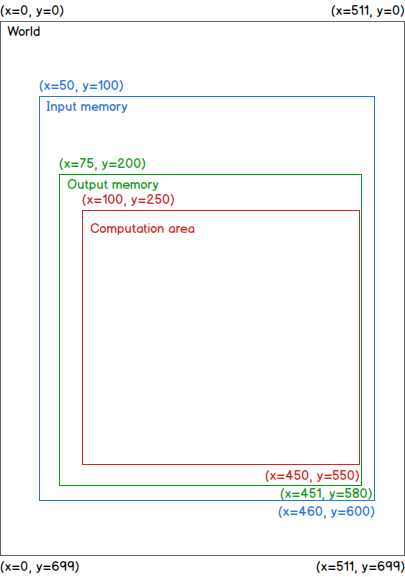
The setIndexFirstVoxelInputChannel method is called with these arguments for the input dataset:
x: 50
y: 100
The setIndexFirstVoxelOutputChannel method is called with these arguments for the output dataset:
x: 75
y: 200
The apply method is called with these arguments:
xMin: 100
yMin: 250
xMax: 450
yMax: 550
It means that the Computation area (red referential) is: [(x=100, y=250), (x=450, y=550)].
To obtain the result of the filter for the pixel located at (x=100, y=250), the pixels located in the area [(x=100-3=97, y=250-5=245), (x=100+3=103, y=250+5=255)] will be required. Similarly, to obtain the result of the filter for the pixel located at (x=450, y=550), the pixels located in the area [(x=450-3=447, y=550-5=545), (x=450+3=453, y=550+5=555)] will be required. Therefore, the input dataset will be given with at least the area [(x=97, y=245), (x=453, y=555)] in memory. Also, the output dataset will be given with at least the area [(x=100, y=250), (x=450, y=550)] in memory. These indexes were all given accordingly to the World (black) referential system of indexes.
To access the data from the input, the first voxel in memory specified for the input dataset needs to be used. The pixel (x=97, y=245) of the World referential corresponds to the pixel (x=97-50=47, y=245-100=145) of the input data matrix (Input memory (blue) referential).
Similarly, the result for the pixel (x=100, y=250) of the World referential needs to be written in the pixel (x=100-75=25, y=250-200=50) of the output data matrix (Output memory (green) referential).
- abstract apply(xMin: int, yMin: int, zMin: int, tMin: int, xMax: int, yMax: int, zMax: int, tMax: int)
Starts the computation of the current filter over the specified area
The output datasets should have their data overwritten in the area described by the indexes xMin, yMin, zMin, tMin, xMax, yMax, zMax and tMax and remain unchanged outside this area.
- Parameters:
xMin (int) – minimal index in X to be computed
yMin (int) – minimal index in Y to be computed
zMin (int) – minimal index in Z to be computed
tMin (int) – minimal index in T to be computed
xMax (int) – maximal index in X to be computed
yMax (int) – maximal index in Y to be computed
zMax (int) – maximal index in Z to be computed
tMax (int) – maximal index in T to be computed
- abstract getAbbreviatedOutputName(outputIndex: int) str
Gets the abbreviated output name
- Parameters:
outputIndex (int) – index of the output of the current filter
- Return:
abbreviated output name of the current filter
- Rtype:
str
- abstract getClassCount() int
Gets the count of classes produced by the filter, if this is defined
- Return:
filter output class count
- Rtype:
int
- classmethod getFilterCanBeUsedForFeatureExtraction(aFilterUUID: str) bool
Deprecated since version 3.1.
- Parameters:
aFilterUUID (str) – the filter UUID
- Returns:
output (bool) –
- classmethod getFilterExist(aFilterUUID: str, aFilterVersion: str, plugin: str) bool
Gets if the filter is found
- Parameters:
aFilterUUID (str) – the filter UUID
aFilterVersion (str) – the filter version
plugin (str) – the name of a plugin using filters
- Returns:
output (bool) – True if the filter is found; False otherwise.
- classmethod getFilterIs2D(aFilterUUID: str) bool
Gets if the filter can be applied in 2D
Deprecated since version 3.1.
- Parameters:
aFilterUUID (str) – the filter UUID
- Returns:
output (bool) – True if the filter can be applied in 2D; False otherwise.
- classmethod getFilterIs3D(aFilterUUID: str) bool
Gets if the filter can be applied in 3D
Deprecated since version 3.1.
- Parameters:
aFilterUUID (str) – the filter UUID
- Returns:
output (bool) – True if the filter can be applied in 3D; False otherwise.
- classmethod getFilterUUIDsFromName(filterName) list
- Parameters:
filterName – the name of the filter
- Returns:
output – a list of tuple (filterClass, filterUUID)
- abstract getFilterUserDescription() str
Gets a readable description of the filter and of his parameters
- Return:
readable description
- Rtype:
str
- classmethod getFilters(plugin=None, reset=False) str
Gets the set of filters supported by this plugin.
It is a concatenation of strings, each having this syntax:
'categoryName/filterName/uuid;'Example:
strToReturn = ''  # Initialization
for aFilter in listOfFilters:
    filterCategory = aFilter._getFilterCategory()
    filterName = aFilter._getFilterName()
    uuid = aFilter._getUUID()
    strToReturn += '{category}/{filterName}/{uuid};'.format(category=filterCategory, filterName=filterName, uuid=uuid)
return strToReturn
- Parameters:
plugin (str) – the name of a plugin using filters
- Returns:
output (str) – details of filters supported by this plugin
- classmethod getFiltersListInformation(pluginName='') list
Gets the list of all filters
- Parameters:
pluginName – name of the plugin
- Returns:
output – a list of tuples containing, for each filter: - filterClass - filterCategory - filterName - filterUUID - filterVersion - outputSliceCount
- abstract getInputChannel(inputChannelIndex: int) str
Gets an input channel
- Parameters:
inputChannelIndex (int) – index of the input of the current filter
- Return:
a Channel GUID
- Rtype:
str
- classmethod getInputChannelCountForFilter(aFilterUUID: str) int
Gets the input channel count for a filter
- Parameters:
aFilterUUID (str) – the filter UUID
- Returns:
output (int) – the input channel count
- abstract getInputChannelLabel(inputChannelIndex: int) str
Gets the label (identification) of an input
- Parameters:
inputChannelIndex (int) – index of the input of the current filter
- Return:
a label
- Rtype:
str
- abstract getInputChannelsCount() int
Gets how many inputs (datasets) are required
- Return:
input count
- Rtype:
int
- abstract getLengthDependenceX(inputChannelIndex: int) int
Gets the extent required in X to perform computations on a subset of the dataset.
This is the largest number of pixels required in X from the pixel of computation (either side). If all the pixels are required, return -1.
Examples:
if only the current pixel is required, this method should return 0;
if only the immediate neighbors are required, this method should return 1.
- Parameters:
inputChannelIndex (int) – index of the input of the current filter
- Return:
extent in pixels
- Rtype:
int
- abstract getLengthDependenceY(inputChannelIndex: int) int
Gets the extent required in Y to perform computations on a subset of the dataset.
This is the largest number of pixels required in Y from the pixel of computation (either side). If all the pixels are required, return -1.
Examples:
if only the current pixel is required, this method should return 0;
if only the immediate neighbors are required, this method should return 1.
- Parameters:
inputChannelIndex (int) – index of the input of the current filter
- Return:
extent in pixels
- Rtype:
int
- abstract getLengthDependenceZ(inputChannelIndex: int) int
Gets the extent required in Z to perform computations on a subset of the dataset.
This is the largest number of pixels required in Z from the pixel of computation (either side). If all the pixels are required, return -1.
Examples:
if only the current pixel is required, this method should return 0. This is usually the case for 2D filters, working slice by slice;
if only the immediate neighbors are required, this method should return 1.
- Parameters:
inputChannelIndex (int) – index of the input of the current filter
- Return:
extent in pixels
- Rtype:
int
- abstract getMinimalXSizeOfChannelForKernel() int
Gets the minimal X size of the input channels for the filter to work properly.
- Return:
the minimal X size of the input channels
- Rtype:
int
- abstract getMinimalYSizeOfChannelForKernel() int
Gets the minimal Y size of the input channels for the filter to work properly.
- Return:
the minimal Y size of the input channels
- Rtype:
int
- abstract getMinimalZSizeOfChannelForKernel() int
Gets the minimal Z size of the input channels for the filter to work properly.
- Return:
the minimal Z size of the input channels
- Rtype:
int
- abstract getOutputChannel(outputChannelIndex: int) str
Gets an output channel
- Parameters:
outputChannelIndex (int) – index of the output of the current filter
- Return:
a Channel GUID
- Rtype:
str
- classmethod getOutputChannelCountForFilter(aFilterUUID: str) int
Gets the output channel count for a filter
- Parameters:
aFilterUUID (str) – the filter UUID
- Returns:
output (int) – the output channel count
- abstract getOutputChannelLabel(outputChannelIndex: int) str
Gets the label (identification) of an output
- Parameters:
outputChannelIndex (int) – index of the output of the current filter
- Return:
a label
- Rtype:
str
- abstract getOutputChannelsCount() int
Gets how many outputs (datasets) are required
- Return:
output count
- Rtype:
int
- abstract getOutputSlicesCount() int
Gets the count of slices returned for a single slice analysis.
This is for filters producing multiple output values for each input pixel, contained into a single output channel.
An example of use for this is with the Segmentation Trainer, where different features have to be computed for each pixel.
- Return:
count of slices returned for single slice analysis
- Rtype:
int
- abstract getSetupDescription() str
Gets an xml formatted description of the filter and of his parameters
- Return:
xml formatted description
- Rtype:
str
- abstract getSuggestedOutputDataType(outputChannelIndex: int)
Gets the suggested data type of a filter output
- Parameters:
outputChannelIndex (int) – index of the output of the current filter
- Return:
suggested data type (from types of class
COMWrapper.ORS_def.CxvChannel_Data_Type)- Rtype:
int
- classmethod getVersionOfFilter(aFilterUUID: str) str
Gets the version number of a filter
- Parameters:
aFilterUUID (str) – the filter UUID
- Returns:
output (str) – version of the filter
- abstract setFilter(filterUUID: str, plugin: str)
Sets the current filter
- Parameters:
filterUUID (str) – the filter UUID
plugin (str) – the name of a plugin using filters
- abstract setIndexFirstVoxelInputChannel(inputChannelIndex: int, x: int, y: int, z: int, t: int)
Tells the filter what is the first voxel represented in memory of an input channel.
- Parameters:
inputChannelIndex (int) – index of the input of the current filter
x (int) – X index of the first voxel represented in memory
y (int) – Y index of the first voxel represented in memory
z (int) – Z index of the first voxel represented in memory
t (int) – T index of the first voxel represented in memory
- abstract setIndexFirstVoxelOutputChannel(outputChannelIndex: int, x: int, y: int, z: int, t: int)
Tells the filter what is the first voxel represented in memory of an output channel.
- Parameters:
outputChannelIndex (int) – index of the output of the current filter
x (int) – X index of the first voxel represented in memory
y (int) – Y index of the first voxel represented in memory
z (int) – Z index of the first voxel represented in memory
t (int) – T index of the first voxel represented in memory
- abstract setInputChannel(inputChannelId: str, inputChannelIndex: int)
Sets an input channel
- Parameters:
inputChannelId (str) – input channel GUID
inputChannelIndex (int) – index of the input of the current filter
- abstract setOutputChannel(outputChannelId: str, outputChannelIndex: int)
Sets an output channel
- Parameters:
outputChannelId (str) – output channel GUID
outputChannelIndex (int) – index of the output of the current filter
- abstract setupFromDescription(description: str, fromPython: bool)
Sets the filter and his parameters from a formatted xml description
- Parameters:
description (str) – xml formatted description
fromPython – True if the xml description needs no modification before being parsed; False if the call comes from C++.
States
A state is a name representing a preferred group of actions to be performed when using keyboard keys, mouse buttons or a combination of these. Generally, this is used to specify the current tool. By doing so, the same keys or mouse combinations can be reused to perform different tasks. For example, the left-button mouse click can be used to perform a Pan, a Zoom, to start a ruler or to paint a ROI with a circular brush; the task performed depends on the selected tool, which is the specified state.
Note
the word handle is sometimes used as a synonym for state.
The following video provides many explanations about states, in relation with actions
(ORSServiceClass.decorators.infrastructure.action()).
To change the state of the application, call
OrsLibraries.workingcontext.WorkingContext.setCurrentGlobalState(), as in:
WorkingContext.setCurrentGlobalState(aPluginInstance, theNewState)
where aPluginInstance is a plugin instance (usually, self, when this call is made in a method
of the plugin implementation class), and theNewState is the string of the state to set.
To get the state of the application, call OrsLibraries.workingcontext.WorkingContext.getCurrentGlobalState().
Specification of the cursor
A cursor icon might be specified for each defined state. This icon is set for the mouse pointer when it comes over a view. Also, the picking location on that icon can be specified with the hotspot specification (in X and Y).
stateDemoCursorStateCornerTopLeft = 'stateDemoCursorStateCornerTopLeft'

# The folder cursoricons contains the cursor icon file cursorPointerCornerTopLeft.png.
# The folder cursoricons is contained in the same directory as the plugin implementation file.
stateDescriptors = [StateDescriptor(state=stateDemoCursorStateCornerTopLeft,
                                    stateActivation='',
                                    title='DemoCursorState: CornerTopLeft',
                                    cursor=':/cursoricons/cursorPointerCornerTopLeft.png',
                                    cursorHotSpotX=0,  # First pixel on the left
                                    cursorHotSpotY=0)]  # First pixel on top
Source code example:
Download the
compressed file;Extract these files into a plugin extension folder;
Start the application;
Go to the preferences to define a key for the actions named Pick for DemoCursorState at CornerTopLeft, Pick for DemoCursorState at Middle and Pick for DemoCursorState at CornerBottomRight;
Open the top level menu Demos to see the menu item named Demo: open the plugin DemoCursorState. Click on that menu item to create an instance of the plugin and open his mainform. At the same time, a ROI is created with a painting of a cross and his borders;
Press the button CornerTopLeft on the plugin UI to put the state of the application in stateDemoCursorStateCornerTopLeft. Note, in the status bar, that the name of the current state is changed for DemoCursorState: CornerTopLeft. Also, the cursor is changed to show that the picking is on the top left of the mouse pointer. Press and hold the key defined earlier to start the action of Pick for DemoCursorState at CornerTopLeft. The light is turned green when the ROI at the pick (hotspot) location has painting, but is turned red when the ROI has no painting at that location. While holding the key, move the mouse pointer over the ROI to see the light turn from green to red, depending on the location of the pointer. The light is turned black when the key is released or if the cursor is not in the borders of the ROI;
Do the same using the buttons Middle and CornerBottomRight to use cursors having different picking locations.
Method handleChanged
In a plugin, the method ORSServiceClass.OrsPlugin.orsPlugin.OrsPlugin.handleChanged() is called when the state of
the application is changed.
This is generally used to update the UI of the plugin.
Source code example:
Download the
compressed file;Extract these files into a plugin extension folder;
Start the application;
Open the Preferences and look in the Configurable Actions section for the name Set state A of DemoHandleChangedState. Set an unused keyboard key for that action. Set a different keyboard key for the action with the name Set state B of DemoHandleChangedState. Apply the changes and exit the Preferences;
Open the top level menu Demos to see the menu item named Demo: open the plugin DemoHandleChangedState. Click on that menu item to create an instance of the plugin and open his mainform. Do this again to create another instance of the plugin with his UI. Move these UIs so that both windows can be seen simultaneously;
Press the specified action key of the action Set state A of DemoHandleChangedState to set this state. Note, in the status bar, that the name of the current state is changed for DemoHandleChangedState: A. Also, the tool button A is now pressed in both UIs;
Do the same with the action key of the action Set state B of DemoHandleChangedState. Note that the status bar has been updated, the tool button A is reset and the tool button B is pressed;
Switch these states using the buttons on the UI of the plugin to see the same effect.
Method handleTriggered
In a plugin, the method ORSServiceClass.OrsPlugin.orsPlugin.OrsPlugin.handleTriggered()
is called on every user input (mouse move, mouse click, key press, …)
when the current state of the application is one of those declared by the plugin.
This method can be used to perform specific tasks even if no action is currently in progress.
Information about the triggering event (an instance of OrsEvent.eventdata.InputEventData) is sent in argument.
This event data contains information such as the stage of execution of an action (enter, stay or exit).
Note
If there are multiple plugins declaring the same state name,
they all receive the call to handleTriggered.
However, this is not a common situation.
When an action is to be executed, the following procedure is done in order:
execution of the
enterActionstring of the action, then call tohandleTriggered. This is done once;execution of the
actionstring of the action, then call tohandleTriggered. This is done repetitively (seeORSServiceClass.decorators.infrastructure.action());call to
handleTriggered, then execution of theexitActionstring of the action. This is done once.
Source code example:
Download the
compressed file;Extract these files into a plugin extension folder;
Start the application;
Go to the Preferences to define a key for the actions named Increment counter in DemoHandleTriggeredState and Neutral in DemoHandleTriggeredState. Apply the changes and exit the Preferences;
Open the top level menu Demos to see the menu item named Demo: open the plugin DemoHandleTriggeredState. Click on that menu item to create an instance of the plugin and open his mainform. At the same time, a ROI is created with a painting of a cross and his borders;
Because the state of the application is not yet in one defined by the plugin, the method
handleTriggeredis not called. The light is set as black and will remain as such even if the mouse pointer goes over the ROI;Press the button A on the UI of the plugin to set the state DemoHandleTriggeredState: A. The method
handleTriggeredis now being called at each user input, including the mouse move. Move the mouse pointer over the ROI to see the light turn from green to red, depending on the location of the pointer. The light is turned black when the cursor is not in the borders of the ROI;Press the specified action key of the action Increment counter in DemoHandleTriggeredState to start this action. This action evaluates the elapsed time between the moment it is started until it is finished. This time is shown on the UI when the action is completed. Also, a counter is incremented by 1 each time a trigger is received;
Press the button B on the UI of the plugin to set the state DemoHandleTriggeredState: B;
Press the specified action key of the action Neutral in DemoHandleTriggeredState to start this action. This action does nothing per itself, but the method
handleTriggeredis still reactive to the mouse pointer location over the ROI.
Temporary actions
Actions can be used to switch to a state temporarily (as long as the associated action key is pressed)
and then return to the state that was the current one before the action was started.
Note that this action continues to be executed until the exitAction
even if that action is state-dependent and the state was changed during the enterAction.
While in the temporary state, other actions dependent on that temporary state can be executed.
Source code example:
Download the
compressed file;Extract these files into a plugin extension folder;
Start the application;
Go to the Preferences to define an unused keyboard key for the action Set temporary state A of DemoTemporaryActionState. For the action Pick in temporary state A of DemoTemporaryActionState, set the same keyboard key combined with the mouse left-button. For the action Pick in state A of DemoTemporaryActionState, set any key (this can be the mouse left-button). Apply the changes and exit the Preferences;
Open the top level menu Demos to see the menu item named Demo: open the plugin DemoTemporaryActionState. Click on that menu item to create an instance of the plugin and open his mainform;
Press the button A on the UI of the plugin to set the state DemoTemporaryActionState: A. Press the specified action key of the action Pick in state A of DemoTemporaryActionState to write the current cursor location in the picking information;
Press the button Set state Track to set the application state as Track, or use any other tool button to change the state of the application. Note that the current cursor position is not updated anymore;
Press and hold the specified action key of the action Set temporary state A of DemoTemporaryActionState to start this action. Note, in the status bar, that the name of the current state is changed for DemoTemporaryActionState: A. Also, the cursor is changed accordingly to that state definition, the button A in the UI of the plugin is also pressed, and the current cursor position is refreshing when the mouse pointer moves;
Click in the main view with the left-button mouse to pick new locations and update the UI;
Release the action key of the action Set temporary state A of DemoTemporaryActionState to end the temporary state switch. Note that the state is changed to the one prior to starting this temporary state switch, as shown in the status bar.
Temporary actions: switching to a state declared by another plugin
During the execution procedure of an action,
the methods handleTriggered called are those of the plugins declaring the current state of the application
at the moment the call should be made.
Source code example:
Download the
compressed file;Extract these files into a plugin extension folder. Note that there is 2 distinct plugins contained in the compressed file;
Start the application;
Go to the Preferences to define the mouse left-button for the action named Set temporary state B of DemoTemporaryActionExternalState. Apply the changes and exit the Preferences;
Open the top level menu Demos to see the menu item named Demo: open the plugin DemoTemporaryActionExternalState A. Click on that menu item to create an instance of the plugin A and open his mainform;
Open the top level menu Demos to see the menu item named Demo: open the plugin DemoTemporaryActionExternalState B. Click on that menu item to create an instance of the plugin B and open his mainform. Move that window so that both UIs can be seen simultaneously;
Press the button A on the UI of the plugin A to set the state DemoTemporaryActionExternalState: A;
Move the mouse cursor in the view. The counter of calls to
handleTriggeredof the plugin A increases on each mouse move event;Bring the mouse cursor on the view and press and hold the mouse left-button to start the state switch action. Do this while making sure the mouse cursor doesn’t move. Note, in the status bar, that the name of the current state is changed for DemoTemporaryActionExternalState: B. Note also that the counter of calls to
handleTriggeredof the plugin A is reset to 0, while the counter of calls tohandleTriggeredof the plugin B increased and is showing the action stage EnterAction;Move the mouse cursor to see the counter of triggers of the action Set temporary state B of DemoTemporaryActionExternalState increase, due to the execution of the string of the
Actionstage. At the same time, the counter of calls tohandleTriggeredof the plugin B is increased and is showing the action stage Action;Release the mouse left-button to end the temporary state switch. The counter of calls to
handleTriggeredof the plugin B is increased one last time and is showing the action stage ExitAction.
Event consumption
The mechanism of actions (see ORSServiceClass.decorators.infrastructure.action()) rely
on the principle that multiple actions may be defined with the same key or mouse button.
For example, some may be conditional, some others may be state-dependent.
By default, the first action called will consume the event and the other actions will be ignored.
However, the method handleTriggered of the plugin called during the EnterAction stage of the action can allow the
next action to be considered by specifying that this event is not consumed
(OrsLibraries.workingcontext.WorkingContext.setEventConsumed()).
For example, in the situation where a key or mouse button is defined for a state-dependent action and a state-independent action and the application is in that state, the default behavior is to execute the state-dependent action only and do nothing with the state-independent action. But the state-independent action may be executed by specifying that this event is not consumed:
def handleTriggered(self, eventData):
    # Starting an action with any highlighted object will give them priority
    highlighted = WorkingContext.getCurrentEntity(self, OrsHighlightedObject)
    if len(highlighted) > 0 and eventData.isEnterAction():
        WorkingContext.setEventConsumed(self, False)
        return

    # Continue with the processing of the event
It is therefore possible, for example, to move an annotation while the current state is for painting ROIs if the action is started when the cursor is placed over that annotation.
Event consumption is considered only at the EnterAction stage; it has no effect during the StayAction and ExitAction stages.
StateActivation
The field stateActivation, defined for each StateDescriptor, is to be used with mouse handlers.
